By default, the copier uses the symbol received from the signal to open trades in the configured MT4/5 account. This may not work at times due to MT4/5 accounts using their own convention of symbols for standard symbols.
1. My MT4/5 account uses a different symbol from the signal’s symbol.
Some MT4/5 accounts use different symbols for the commonly used symbols. With the Telegram2MT4 copier, users can use the symbol convert option in the EA settings to allow the copier to map the signal symbol with the MT4/5 account symbol accurately.

Example:
The following signal is sent on a Telegram channel.
XAUUSD SELL

ENTRY 1915.30
SL 1920.30
TP 1913.80
TP 1912.30
TP 1910.30
And you received the following error:
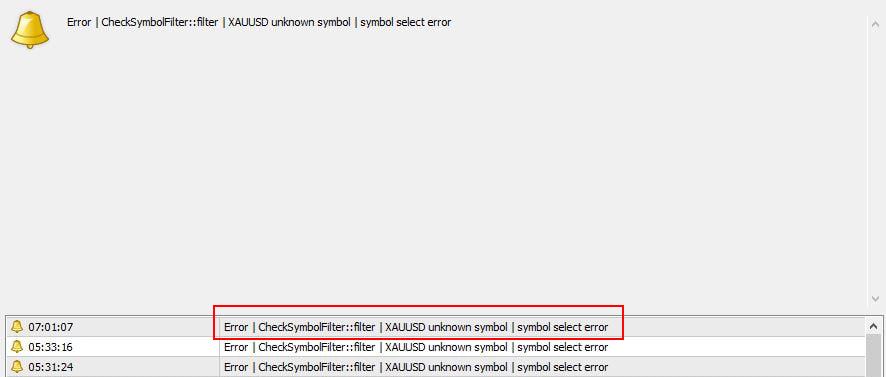
This error occurs due to the MT4/5 account not using XAUUSD but a different symbol instead for it.
For instance if the the symbol used for XAUUSD in the MT4/5 account is GOLD, the user should enter the following in EA settings in order to allow the MT4/5 to identify the symbol and open trades.

2. My MT4/5 account uses prefix/postfix for symbols.
2.1 Prefixes
Some MT4/5 brokers use prefixes with their symbols. In such cases, users can use the prefix settings in EA settings to define the prefixes used in their account.

Example:
The signal uses XAUUSD and MT4 uses a.GOLD for same, When mapping symbols the user is required to add it as shown below.

the "a." prefix should be added in the EA settings as shown below.
2.2 Postfixes
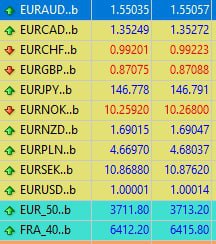
The above screenshot includes symbols used by a MT4/5 broker. The MT4/5 account uses “..b” postfix for symbols.
In such cases, users can add the postfix used in the MT4/5 account in the postfix input under EA settings as shown below.

Users must also keep in mind that when adding symbol conversions, the postfix should be added to the MT4/5 symbol.
Example:
The signal uses XAUUSD and MT4 uses GOLD for same, When mapping symbols the user is required to add it as shown below.

"XAUUSD" = "GOLD..b"
2.3 Auto detection of affixes and mappings
The Telegram2MT4 copier is capable of automatically detecting common symbol prefixes and postfixes. If this setting is set to “True” the copier will attempt to map these automatically.
We recommend this method to our customers over manual mapping of prefixes and postfixes as this method is effective for most accounts available.
Users should also keep in mind that if this setting is enabled (True), Other Prefix and Post-fix settings will be disabled.