
The most frequent problem that most signal followers face is getting a different entry price than signal their signal provider. This may result in the following:
- Less profit
- Inability to move the stop-loss to entry price when the signal provider does.
- In some cases the entry price is higher(buy signals)/lower(sell signals) than the first take profit level.
The copier EA has 5 open modes under Trading options > Open mode. You can refer to them by following the link below.
In this article we will discuss options a trader can explore to improve their odds on entries.
Strategy #1 – Signal provider posted the signal late.
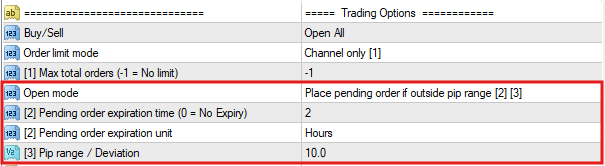
The “Place pending order if outside pip range [2] [3]” mode can be used for this problem. If the entry price is too far from the current market price, the copier EA will place a pending order. If it is within the specified pip range, a market order will be placed.
The user can define the the pip range to place the pending order in “[3]Pip range / Deviation” setting.
Strategy #2 – You can’t get the entry price right
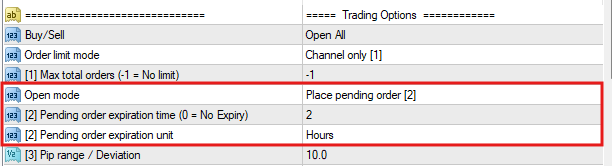
You can try using the “Place pending order [2]” mode. The copier will place all buy/sell signals as pending orders(buy-limit,sell-limit, buy-stop,sell-stop) with the mentioned entry. This ensures the entries are same as the signal.
Make sure to set the expiry time for the pending order. You do not want pending order placed today to execute at the target price tomorrow!
Use a shorter expiry if the market is volatile or longer when the market is less volatile.
The are many reasons to explain price differences with different brokers and account types. You can refer the full article about it with detailed examples and solutions covering all aspects of price differences by following the link below.
Strategy #3 – It is better to avoid trades with late entries
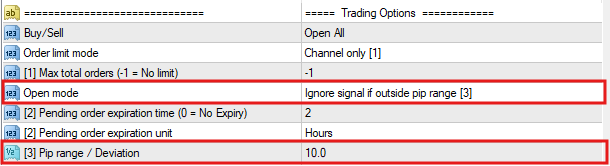
Try to avoid signals which are late or too far. There is a higher chance you will lose money on that trade. It is preferable to ignore trades which are out of a certain price band.
Use “Ignore signal if outside pip range [3]” mode. This is similar to “Place pending order if outside pip range [2] [3]” mode except, it does not place a pending order if the price is out of range.
The user can define the the pip range to place the pending order in “[3]Pip range / Deviation” setting.