- Use layer feature mainly to minimize losses arising from a losing signal. You can make adjustments to the signal by adding another position to the signal.
- layer trade will not trigger for a signal that has pending orders.
- Layer trade is connected to the original signal it was replied to. (read more on signal replies/commands)
- Only one open layer trade per signal is allowed at a given time.
- Read more on layer feature’s EA settings layer settings.
How to trigger a layer trade
A layer trade can be triggered when a signal is replied with “layer keywords“. Also,make sure to set “Enable layer command?” to true in EA settings.


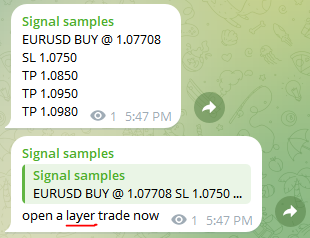
How layer trade works
When a layer command is triggered, the copier will add another position to the signal at a new price. You can use this technique to to minimize the loss of an opened signal by offsetting the loss of the existing signals by the new trade’s profit.
However, this technique does not guarantee loss minimization. Sometimes market may still go against your initial expectation and the layer trade will also add to your losses. Therefore, use this feature with caution.
Layer reference
A layer trade is always opened in reference to a trade in the signal. The layer trade will copy the lot size, operation, stop-loss and take-profit from the signal. You will be able to select what trade in the signal to refer to as well as the lot multiplier
Lets look at an example
You have three trades opened by a signal
EURUSD BUY @1.1000 Lots 0.01 SL: 0.9000 TP1: 1.1100
EURUSD BUY @1.1000 Lots 0.02 SL: 0.9000 TP2: 1.1200
EURUSD BUY @1.1000 Lots 0.03 SL: 0.9000 TP3: 1.1300

Now the market has moved to 1.0000 and the signal is at a loss. If the market is expected go further below, the trader can decide to open a reverse trade with reference to the TP3 trade and lot size multiplier as 2.

Now the portfolio will look like this
EURUSD BUY @1.1000 Lots 0.01 SL: 0.9000 TP1: 1.1100 ($-10)
EURUSD BUY @1.1000 Lots 0.02 SL: 0.9000 TP2: 1.1200 ($-20)
EURUSD BUY @1.1000 Lots 0.03 SL: 0.9000 TP3: 1.1300 ($-30)
EURUSD SELL @1.0000 Lots 0.06 SL: 1.1300 TP3: 0.9000 ($0)

The market hits 0.9000 mark and closed all 4 trades. The final result will be.
EURUSD BUY @1.1000 Lots 0.01 SL: 0.9000 TP1: 1.1100 ($-20)
EURUSD BUY @1.1000 Lots 0.02 SL: 0.9000 TP2: 1.1200 ($-40)
EURUSD BUY @1.1000 Lots 0.03 SL: 0.9000 TP3: 1.1300 ($-60)
EURUSD SELL @1.0000 Lots 0.06 SL: 1.1300 TP3: 0.9000 ($+60)

Net loss without layer = $-120
Net loss with layer = $-60
Another example

